Friday, 22 January 2016

Dual Xeon Motherbaords for Workstations

Dual Xeon Motherbaords for Workstations


Supreme Graphic Power with IPMI 2.0-compliant manageability


  • Dual Intel® Socket 2011-3/ Intel C612 PCH chipset

  • Streamlined-airflow design with 16 DIMM slots

  • Supreme Power Solution – Premium components deliver industry-leading power efficiency

  • Unique BIOS for Dual CPU O.C. –Boost CPU’s overclocking performance up to 10%

  • Complete remote server management with IPMI 2.0-compliant ASMB8-iKVM module and ASWM Enterprise


ASUS Z10PE-D16 WS LGA2011-v3/ Intel C612 PCH/ DDR4/ Quad CrossFireX and 3-Way SLI/ SATA3&USB3.0/ M.2/ A&V&2GbE/ EEB Server Motherboard

The Asus Z10PE-D16/4L is a powerful server motherboard for the Xeon E5-2600 V3 family of processors. It can house two such CPUs, along with a massive amount of RAM and several SATA drives. It includes multiple USB 2.0 and gigabit Ethernet ports for connectivity, basic onboard graphics, and several PCI-Express 3.0 slots for additional expansion. It also comes bundled with an Asus IKVM module for remote management, and supports PIKE cards for adding advanced RAID functionality.


We have tested this board to work with VMWare VSphere 5, making it a great virtualization platform. It also works equally well with traditional operating systems like Windows 7 (Professional and above), Windows Server and Linux.


SupermicroX10DAI-O Server Motherboard


Supermicro X10DAI-O Server Motherboard


Product Highlights


  • E-ATX Form Factor

  • Dual Socket R3 LGA 2011

  • Intel C612 Chipset

  • Supports Intel Xeon E5-2600 v3 Family Processors

  • Supports up to 1TB ECC DDR4 2133 MHz RAM

  • 3 x PCIe 3.0 x16 Slots

  • 2 x PCIe 3.0 x8 Slots

  • Intel i210 Dual Port GbE LAN

  • 7.1 HD Audio with Optical S/PDIF

  • Support Thunderbolt Add-on Card

The Supermicro X10DAC is a new workstation motherboard targeted at dual Intel Haswell-EP deployments with significant integrated storage needs.. Using our model name decoder ring we see the “X10” series (socket LGA2011-3 generation), “D” dual socket, with “A”udio. There are several other motherboards in the X10DA series, including the X10DAi we reviewed recently. One of the key features of the X10DAC is an onboard LSI / Avago SAS3008 HBA. Longtime STH readers will recognize that Supermicro motherboards with integrated components are often a more cost-effective way to add features to a server or workstation. The X10DAC is no exception as it has a street price premium of under $100 over the X10DAi but effectively includes a $250-300 SAS controller.


Test Configuration


We used a fairly typical DP workstation setup for this type of platform and what we have used previously in our Intel Xeon E5-2600 V3 coverage.


  • CPU: 2x Intel Xeon E5-2690 V3

  • Motherboard: Supermicro X10DAC

  • Memory: 8x SK. Hynix 16GB DDR4 2133MHz ECC RDIMMs

  • SSD: 2x Samsung 840 Pro 256GB 4x Crucial M500 240GB, 3x SanDisk CloudSpeed Ultra 800GB SATA, 3x Intel S3700 100GB

  • Video Cards: NVIDIA K4000, Zotac GT610

  • Operating Systems: Ubuntu 14.04 LTS, Windows Server 2012 R2, VMware ESXi 5.5, CentOS 6.5

The test platform was rather expansive due to the enhanced SSD capacity of the motherboard.


Supermicro X10DAC Overview


The Supermicro X10DAC is an EATX motherboard measuring a class standard 13″ x 12″. This EATX form factor can be fit into everything from 4U style cases to smaller mid towers such as the Supermicro SC732i.


Supermicro X10DAC Overview


Supermicro X10DAC Overview


When dealing with smaller chassis, one does need to ensure they fit an EATX motherboard and large enough coolers. We are using the Supermicro SNK-P0050AP4 which is our standard cooler for thermal testing all LGA2011 motherboards. This solution will fit in most smaller 4U sized enclosures.


Looking at the CPU and memory layout, one can see that the 16 DIMM slots and 2 CPU sockets are aligned for front-to-back cooling. Supermicro’s workstation chassis and most rackmount chassis are built with this layout as it is very efficient.


Supermicro X10DAC CPU and Memory


Supermicro X10DAC CPU and Memory


One great feature with the X10DAC is that the heatsink mounting pattern is the square ILM rather than the narrow ILM found on many similar motherboards. This means that one has a wide range of thermal solutions available for the motherboard. Many prosumer workstation motherboards sacrifice using either narrow ILM heatsink mounting or only 4 DIMMs/ CPU (8 total) designs. The X10DAC has square mounting and can accept up to 16x DDR4 RDIMMs for 512GB ECC RDIMM capacity or 1TB of LRDIMM RAM.


Both the CPU and ATX power connectors are along the top side of the motherboard which works very well with cases that follow traditional server/ workstation layouts. The warning stickers on the 8-pin CPU power connectors warn users that they should be utilized for high-power applications. We strongly suggest using both and a compatible power supply for dual socket configurations to ensure stability.


Supermicro X10DAX Hyper-Speed Hardware


The Supermicro X10DAX is an EATX motherboard measuring 12″ x 13″. For the Xeon E5 era of dual processor motherboards, this is a standard form factor. Supermicro has a list of about a dozen chassis designed to fit this motherboard from workstation towers to rackmount chassis.


Supermicro X10DAX Overview


Supermicro X10DAX Overview


Like other closely related Supermicro designs, the X10DAX is a 2 DIMMs per channel (2DPC) design. When fit into the relatively smaller motherboard size crammed with other functionality, it means that the processors are offset only slightly. There is enough cooling to the second CPU but it will run warmer than in fully offset designs.


One can see that Supermicro is using the square ILM design. This means that there is a broad thermal solution compatibility as there have been three generations of Xeon processors with this same square ILM layout.


Supermicro X10DAX CPU and Memory


Supermicro X10DAX CPU and Memory


In terms of PCIe slots, there are three PCIe 3.0 x16, two PCIe 3.0 x8 and a PCIe 2.0 x4 in an x8 slot. As a quick tip: we found that using the top PCIe 3.0 slot worked well with our test GPU, however using the top PCIe x8 physical slot for video was sub-optimal. The top slot would have a full length card obstructed by DIMM slots so it is advisable in either case to use that top PCIe x16 slot for GPUs.


Supermicro X10DAX PCIe Slots


http://www.dubaigamers.net/wp-content/uploads/2016/01/Dual-Xeon-Motherbaords-for-Workstations.jpg http://www.dubaigamers.net/2016/01/22/dual-xeon-motherbaords-for-workstations/ Dual Xeon Motherbaords for Workstations

Thursday, 21 January 2016

Asus Maximus VIII Formula Review

Asus Maximus VIII Formula Review


Cast your minds back to our Asus Maximus VIII Formula review back in 2015. To save you reading through the whole review to find a specific quote concerning the RGB lighting, here it is:


…we’d like to see Asus go further here and allow enthusiasts to truly colour-match their motherboard to the rest of their system, instead of just one heatsink.


Either Asus Maximus VIII Formula was listening or we happened to precisely predict it’s next big ROG launch for Skylake systems. The Maximus VIII Formula, folks, is exactly what we asked for when it comes to customisation because, as you can see, there are no red logos here to mess up your desired colour scheme.


The only colours you’ll see, in fact, are from the RGB lighting system that sits beneath that large shroud on the PCB, and this means that as the rest of the board is a mixture of black and silver, whether you want your ATX board to be green, blue orange, or any other colour, including white of course, the Formula is perfect for this.


Now we’ve calmed down a bit, lets talk about the rest of the specification before we look at the lighting system in more detail. You may have glossed over the figures after the £ or $ signs above to get straight to the eye candy that sits below and if that’s you, prepare for a shock. This Z170 motherboard will set you back no less than £286 – that’s the RRP Asus has given us and it’s available to order right now in the US for a whopping $400.


There’s no getting around it – that is a huge amount for a Z170 motherboard. In fact, many X99 boards can be had for literally half the price and it’s also considerably more that the two of the current heavyweights in the Skylake arena – the excellent MSI Z170A XPOWER Gaming Titanium Edition and Asus Z170-Deluxe.


Asus Maximus VIII Formula Review Asus Maximus VIII Formula Review

Click to enlarge

As well as the RGB lighting system, though, there’s one other feature that eats into that price tag to help justify it – a full VRM waterblock. Not only is this CrossChill waterblock designed in collaboration by EKWB, but it actually makes direct contact with the VRMs too – the proof is below. A lot of integrated waterblocks we’ve seen make a half-hearted effort to straddle a heat pipe or two and are largely aesthetic but this is essentially a water-cooled heatsink that will do the job whether you hook your cooling loop up to the two G1/4in ports or go with air cooling.


Asus Maximus VIII Formula Review Asus Maximus VIII Formula Review

Click to enlarge

In terms of cooling performance, once we’d hooked it up to an Alphacool-based water-cooling setup including a Laing DDC pump and 240mm radiator, it did indeed make a difference. With our CPU at 4.8GHz using 1.4V vcore, the VRMs were reported to be 5°C cooler than air alone as reported in Asus’ included AI Suite software, while the top surface was 4°C cooler using an infrared thermometer. This was on an open test bench – inside a toasty PC case, the ability to get shot of this heat through a radiator could be even more beneficial. In addition to this, there’s a huge metal backplate that not only protects the PCB, but provides additional cooling on the rear of the VRMs too.


Asus Maximus VIII Formula Review Asus Maximus VIII Formula Review

Click to enlarge

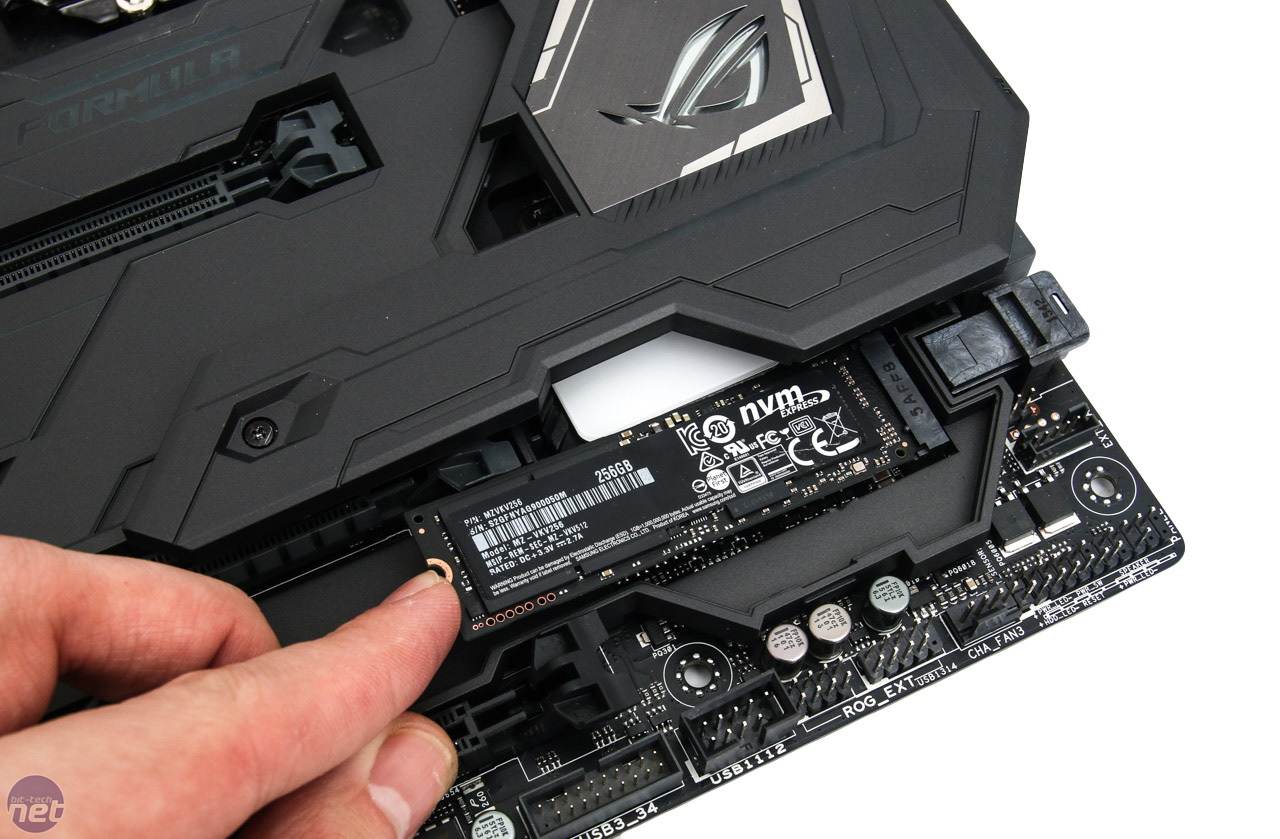
The usual hardware specs are nothing to be sniffed at either. You get the standard six SATA 6Gbps ports powered by the Intel chipset plus a further two via the ASM1051 controller, along with two shared SATA Express ports. Sitting alongside these is a PCI-E 3.0 x4 U.2 port plus as you’d expect, a similarly sprightly M.2 port that accepts up to 110mm SSDs, which slot in underneath a removable section of the plastic shroud behind the SATA ports.


Asus Maximus VIII Formula Review Asus Maximus VIII Formula Review

Click to enlarge


USB 3.1 doesn’t come via ASMedia, though, instead, Asus has slapped on Intel’s Alpine Ridge chip, although Asus has said there’s no current support for Thunderbolt over the USB 3.1 ports with the Formula. As far as ports are concerned you get one of each – Type-A and Type-C, plus four USB 3 ports from the Intel chipset and another two from the ASMedia controller

Asus Maximus VIII Formula As you’d expect from a high-end Asus board, there’s a mass of overclocking and testing tools. You get three thermal probe headers, four chassis fan headers in addition to the usual two for the CPU plus one exclusively for powering all-in-one liquid cooler pumps. Asus leaves nothing to chance with onboard buttons either, with nifty covered and illuminated power and reset buttons below an LED POST code display, with the I/O panel offering a CMOS clear button and one for Asus’ USB BIOS Flashback too.


Asus Maximus VIII Formula

Audio is provided courtesy of the Realtek-based ROG SupremeFX 2015, which offers SupremeFX Shielding Technology, an ESS ES9023P stereo DAC, 2VRMS drivers plus Nichicon capacitors as well as tying in with Asus’ Sonic Studio II. Being an ROG motherboard, the Formula also sports numerous other software features such as RAMDisk and Keybot II – you can read more about them in our Maximus VIII Impact and Maximus VIII Gene reviews.


Asus Maximus VIII Formula Review Asus Maximus VIII Formula Review

Click to enlarge

802.11ac WiFi is included along with a desktop aerial, while quad-GPU SLI and 3-way CrossFireX are supported, courtesy of two 16x PCI-E 3.0 slots (which operate at x8 mode when two GPUs are used) plus a third 16x slot that is limited to x4 mode. In addition to these, there are also three PCI-E 2.0 1x slots with one located above the primary 16x slot so should always be accessible.


Asus Maximus VIII Formula Review Asus Maximus VIII Formula Review

Click to enlarge

Back to the lighting control and there are two channels available – the motherboard and a standard RGB strip light header – both of which can be controlled separately using the included Aura lighting suite. The motherboard has several RGB LEDs, which illuminate three portions of the board – the ROG logo on the PCH heatsink cover, two strips along the left side of the shroud and finally the Formula logo and strips beneath the CPU socket.


As well as colours and brightness, you’re able to select from five modes including syncing the lighting with CPU temperature – or you could turn them off completely of course. It’s easy to use, very effective and if you’re in the least bit bothered about colour matching your motherboard to your case (lets face it, this is a lot easier than spraying your heatsinks), the Formula is rather compelling.


Asus Maximus VIII Formula Review

Click to enlarge


Asus Maximus VIII Formula Specifications


  • Chipset Intel Z170

  • Form factor ATX

  • CPU support LGA1151 compatible (Skylake)

  • Memory support Dual-channel, 4 slots, max 64GB

  • Sound 8-channel ROG SupremeFX 2015

  • Networking Intel I219V Gigabit LAN, 802.11ac dual-band WiFi

  • Ports 6 x SATA 6Gbps via Intel Z170, 2 x SATA Express, 2 x SATA 6Gbps via ASMedia, 1 x M.2 PCI-E 3.0 x4 (up to 22110), 1 x USB 3.1 Type-C, 1 x USB 3.1 Type A, 10 x USB 3.0 (6 x via header), 4 x USB 2.0, 1 x LAN, audio out, line in, mic, Optical S/PDIF out, HDMI 1.4, DisplayPort

  • Dimensions (mm) 305 x 244

  • Extras Isolated audio circuitry, EK VRM waterblock, protective back plate, RGB lighting

http://www.bit-tech.net/hardware/2016/01/12/asus-maximus-viii-formula-review/1


http://images.bit-tech.net/content_images/2016/01/asus-maximus-viii-formula-review/maximus-viii-formula-1-300x292.jpg http://www.dubaigamers.net/2016/01/21/asus-maximus-viii-formula-review/ Asus Maximus VIII Formula Review

Wednesday, 20 January 2016

Asus RT-AC5300 Gaming Router Review


Asus RT-AC5300 Gaming Router Review


When it comes to your wireless network, investing in a high quality, top-performing router from a reputable brand is essential if you want the fastest speeds, best coverage, and most security. Asus has been a leader in the networking industry and they’ve proven it yet again with their latest release, the RT-AC5300 Gaming Router. It’s new to the market and packed with some fantastic features that boost speeds, improve security, and improve the overall access and experience of your network. Ideal for gaming, it’s equipped with the most advanced technologies to make your experience latency-free for multiple devices at once.

Asus RT-AC5300 Tri-Band Wireless Gaming Router

Speed and Hardware


Since the Asus RT-AC5300 Tri-Band Wireless Gaming Router utilizes the latest 4×4 802.11ac MU-MIMO technology, it’s ready for a combined data rate of 5334 Mbps to offer plenty of insane speeds to every device connected to your network. Equipped with a 1.4 GHz dual core processor and 512 MB of RAM, it won’t have any issues with efficiency or transfer speeds.

Asus designed the RT-AC5300 to outperform anything that’s currently on the market, making it a top choice for 2016. Thanks to NitroQAM Technology, users will experience a seamless experience without any buffering. Whether you’re streaming your favorite movies or playing your favorite game on the highest settings, the combined transfer speeds of 5334 Mbps offers a 67% faster improvement over the previous generation tri-band. Additionally, it’s also built with an internal game accelerator that automatically optimizes the wireless signal to lower the ping time by 30 to 60% and make way for minimal packet loss with 70 to 90% efficiency. This technology will optimize the route in which your signal is received and make sure that there’s always a proper connection without having to deal with poor signals or dropped connections.

Asus RT-AC5300 Tri-Band Wireless Gaming Router

Cross-Platform


Nowadays, most networks are made up of multiple connected devices that are often based on different operating system and/or platforms. The Asus RT-AC5300 Tri-Band Wireless Gaming Router was built with cross-platform compatibility so every feature will work equally well whether you’re on Windows, Mac, Linux, or your favorite Game Console. Even smartphones and tablets are able to benefit from all of the exciting features that the RT-AC5300 has in store.

Adaptive QoS


You can tell that Asus made this router with hardcore gamers in mind. With Adaptive QoS, you’ll get an extra boost in your gaming bandwidth so that you can prioritize certain packets over others. With it, you can turn on “Solo Mode” which will give full dedication to the game at play. This makes the perfect solution for gaming in areas of your home where the signal is far from the router and your game is the top priority.

Asus RT-AC5300 Tri-Band Wireless Gaming Router

Security


Thanks to AiProtection powered by Trend Micro, you’re always safe from threats that would normally leave your devices vulnerable to hackers and infections. It combines a multiple array of features that includes parental controls, malicious website blocking, and automatic vulnerability detection. It’s enterprise-level security that comes standard and built in right out of the box. Additionally, the parental controls give you access to monitor and restrict internet use for any user that’s using the network. This way, your children’s devices can be easily configured to automatically block adult websites or content that you never want them to come into contact with. It also filters out certain restricted apps that have no business being installed by your children. And best of all, you can setup intuitive time scheduling to configure time restrictions for certain devices.

Link Aggregation


Asus added a really cool feature that can significantly upgrade data transfer speeds called “Link Aggregation”. With it, you can use two Gigabit Ethernet cables (one in each port) to connect to any network attached storage device that has this feature unlocked. It gives you faster transmission speeds that are no less than 1 Gigabit and no more than 2 Gigabits. This significant speed upgrade isn’t available on all network attached storage devices, but if it’s available on yours, this is a great thing to take advantage of.

Asus RT-AC5300 link aggregation

Coverage


The wireless coverage is absolutely fantastic thanks to eight massive antennas that are setup to improve the signal range and stability. Four antennas are dedicated to receive, and the four other are dedicated to transmit. These antennas are large and quite obvious, but give the router a godlike appearance that’s ready to impress. Additionally, there’s a technology called “AiRadar” that “beam forms” your WiFi signal so it can handle large obstructions that may be between your device/computer and your router. Overall, it makes for a clearer, stronger, and more reliable signal in all areas of your home or office.

ASUSWRT Software


Asus equipped the RT-AC5300 with their own “ASUSWRT” software interface that gives you the in-depth controls of your network right at your fingertips. This makes the initial setup process a breeze by offering a dashboard interface of all the configurations you’re able to work with. From a basic network map to advanced LAN, WAN, IPv6, AiProtection settings and more, you’re given total control over how your network is configured.

asuswrt software

Sharing Center


The RT-AC5300 makes it easy to share and connect all sorts of peripherals to enable things like file sharing, printer sharing, 3G/4G sharing, and backups. Since there’s a USB 3.0 and a USB 2.0 port, just about any device has the ability to directly connect onto your network for devices on your network to use. The most common use for these USB ports are printers and hard drives. Since both a hard drive and a printer can be connected via USB simultaneously, it can add a significant upgrade to your overall home or office network layout.

What’s Included?


There are a few additional accessories that come included in the box when you purchase it. The quick start guide will give you a brief run-down of what needs to be done to get the router up and running for the first time. There’s a support CD that includes the user manual and utility application for manual configurations and setup. Also, an RJ-45 network cable, power adapter, and the external detachable antennas are all included. One last key piece is included and that’s the warranty card. Asus covers their product with a generous 2 year warranty period and offers 24/7 technical support in case you have any trouble setting it up for the first time.

Asus RT-AC5300 Tri-Band Wireless Gaming Router

Overall Thoughts


The Asus RT-AC5300 Tri-Band Wireless Gaming Router has a lot going for it. With incredibly fast speeds, fantastic security, and a wide range of useful features, you can add a significant upgrade to your home or office network by investing in this router. It’s no secret that it’s quite expensive, but there are plenty of ways to justify the somewhat steep price tag. As a top pick for 2016 and one of the fastest and most incredible gaming routers we’ve ever laid eyes on, we highly recommend it to anyone that requires the fastest network speeds.

http://nerdtechy.com/asus-rt-ac5300-tri-band-wireless-gaming-router-review


http://www.dubaigamers.net/wp-content/uploads/2016/01/Asus-RT-AC5300-Gaming-Router.jpg http://www.dubaigamers.net/2016/01/20/asus-rt-ac5300-gaming-router/ Asus RT-AC5300 Gaming Router Review

Friday, 15 January 2016

Asus PG279Q ROG Swift In UAE

Asus PG279Q ROG Swift In UAE


Asus PG279Q ROG Swift


The Asus PG279Q Gaming display has a maximum supported resolution of 2560×1440, also referred to as WQHD resolution. For a majority of gamers, this particular resolution is the most preferred one because of the faster GPUs you can get nowadays. They aren’t powerful enough (at least one of them) to be sufficient for 4K gaming at high refresh rates, so 1440p at 144Hz will have to do. Refresh rate means a lot more than resolution for most gamers anyways, so that is not a problem. And to top it off, this monitor is capable of reaching a maximum refresh rate of 165Hz when G-SYNC is enabled. (Only supported on GTX 960 and higher)!!


OcUK expects first shipments of this absolute stunning gaming monitor in November, stock shall be very tight and we expect limited numbers so we advice pre-ordering as early as possible to avoid disappointment and to have a monitor before Christmas.
Asus PG279Q ROG Swift-1


Features:

– Worlds first 165Hz panel with NVIDIA G-SYNC Technology

– 27-Inch, 2560×1440 2K/WQHD resolution IPS panel with superb 1000:1 contrast ratio, 350cd/m of brightness

– Super-narrow bezel design for seamless multi-display setups

– Asus exclusive 5-way OSD navigation joystick, GamePlus and 60-120-165Hz Turbo hotkey for an in-game advantage

– Ergonomic design with full tilt, swivel, pivot and height adjustment. VESA mount compatible

– Features a signature and mysterious base pattern with the illuminated LED light-in-motion on the chassis for ROG brand synergy

– DisplayPort, HDMI and USB3.0 Hub
Asus PG279Q ROG Swift

Specification:

– Fully adjustable stand: tilt/swivel/pivot/height

– Screen Size: 27″ (69cm)

– Resolution: 2560×1440 WQHD

– Panel: IPS

– Response Time: 4ms

– Refresh Rate: 165Hz (G-SYNC ONLY / GTX 960 & Above)

– Brightness: 350cd/m

– Contrast ratio: 1000:1 (100,000,000:1 DCR)

– Connectivity: 1x DisplayPort & 1x HDMI

– USB 3.0 Hub

– G-Sync Enabled

– Warranty: 3yr

– OcUK Exclusive Service: Warranty regarding dead pixels falls under ISO rules and as such dead pixels if very few are not an actual fault. But at OcUK we value our customers especially when spending such a large amount of money on what is a flagship gaming monitor. As such even if you only have 1 dead/stuck pixel and it has not gone after 3 days, we will class the monitor as faulty and exchange it for you at no cost to you. This service is exclusive at OcUK for Asus ROG Swift ONLY or other qualifying monitors! (Valid for 28 days from purchase)!


Notes/FAQ:

– 165Hz G-SYNC mode is ONLY supported on GTX 960 and above, GTX 700 series only support upto 120Hz!!

– 3x NVIDIA GeForce GTX660Ti BOOST GPU or higher in 3-way SLI configuration are needed, or GPU with 3x DP connectors for surround mode.

– Driver version 355.60 already released for all G-SYNC-supported graphics cards. If you are using GTX 9 series graphics cards, you can download 355.60 or latest version from NVIDIA website.

NVIDIA® G-SYNC™ Technology only works with NVIDIA’s graphic cards. Other GPUs are NOT able to support this technology.

– NVIDIA® G-SYNC™ Technology automatically scales up your contents displayed to 2560 x 1440. The DisplayPort supports 2560 x 1440 up to 165Hz. The HDMI only supports 2560 x 1440 @ 60Hz.

– The ROG SWIFT PG279Q can support G-SYNC Surround (3x SWIFT PG279Q) up to 7680 x 1440 (*Driver version 355.60 already released for all G-SYNC-supported graphics cards. If you are using GTX 9 series graphics cards, you can download 355.60 or latest version from NVIDIA website.)

– PG279Q does NOT support NVIDIA® 3D Vision™ .

– NVIDIA ® Ultra Low Motion Blur (ULMB) Technology works only at 85Hz, 100Hz, 120Hz.


https://www.overclockers.co.uk/asus-pg279q-rog-swift-27-2560×1440-ips-g-sync-165hz-gaming-widescreen-led-monitor-black-red-mo-088-as.html


http://static.bhphoto.com/images/images500x500/asus_pg279q_1450103721000_1206298.jpg http://www.dubaigamers.net/2016/01/15/asus-pg279q-rog-swift/ Asus PG279Q ROG Swift In UAE

Thursday, 14 January 2016

Rendering Workstations in Dubai, UAE

Rendering Workstations in Dubai, UAE


Workstation (WS)


Definition – What does Workstation (WS) mean?


A Rendering Workstations (WS) is a computer dedicated to a user or group of users engaged in business or professional work. It includes one or more high resolution displays and a faster processor than a personal computer (PC). A Rendering Workstations also has greater multitasking capability because of additional random access memory (RAM), drives and drive capacity. A workstation may also have a higher-speed graphics adapters and more connected peripherals.


The term Rendering Workstations also has been used to reference a PC or mainframe terminal on a local area network (LAN). These workstations may share network resources with one or more large client computers and network servers.


Techopedia explains Workstation (WS)


Workstations usually are built with an optimized design for complex data manipulation and visualization. Examples include image rendering and editing, computer-aided design (CAD), animations and mathematical plots. Workstations were the first industry segment to market collaboration tools and advanced accessories and enhancements. These include 3D mice, multiple displays and high performance/capacity data storage devices.


Eventually, mainstream PCs adopted workstation elements contributing to the decline of the workstation market segment. Additionally, the cost differential decreased between lower-end workstations and higher-end PCs. Low-end workstations used Intel Pentium 4 or AMD Athlon 64 CPUs, whereas high-end PCs used powerful processors such as the Intel Xeon, IBM Power, AMD Opteron or Sun UltraSPARC – a powerhouse for computer-processing work. These latter machines are sometimes referred to as workstation class PCs and include features such as:


  • Error-correcting code (EEC) memory support

  • Additional memory sockets for registered modules

  • Multiple processor sockets for more powerful CPUs

  • Multiple displays

  • Reliable operating systems (OSs) with advanced features

  • High-performance graphics cards

Currently, Sun Microsystems manufacturers the only workstations, which use x86-64 microprocessors and Windows, Mac OS X, Solaris 10 and Linux-distributed operating systems.


Best workstation: the top enterprise desktops


1. Dell Precision T7610


Meet the world’s most powerful workstation, so says Dell


CPU: Up to two Intel Xeon processor E5-2600 v2 processors | Graphics: AMD FirePro or Nvidia Quadro | RAM: 16GB | Storage: 3TB, 7200RPM | Ports: 9 USB 2.0, 4 USB 3.0, Serial, RJ45, PS2, SATA, headphone, microphone | Connectivity:Optional | Size: 16.95 x 8.50 x 20.67 inches


Ample expansion

Powerful processor

Bulky and heavy

Limited configuration options

The Dell Precision T7610 is a capable mid-range workstation that is expertly designed, sturdy, powerful and reasonably priced for what it offers.


Fujitsu Celcius W530


2. Fujitsu Celsius W530


An impressive and compact desktop workstation


CPU: 2.6GHz quad-core Intel Core i7-4790 | Graphics: AMD FirePro or Nvidia Quadro | RAM: 32GB | Storage: 256GB SATA III SSD | Ports: 9 USB 2.0, 4 USB 3.0, VGA, DisplayPort, DVI, Serial, RJ45, PS2, eSATA, headphone, microphone |Connectivity: Optional | Size: 6.9 x 16.5 x 15.6 inches


Fast Haswell-based Xeon processor

Nvidia Quadro K2200 graphics

Single processor socket only

No support for DDR4 memory

The W530 is a solid performer which is more than capable of hosting basic CAD/CAM applications, and it represents good value for money.


Apexx 2


3. Boxx Apexx 2


A high-end performance machine


CPU: Quad-core Intel Core i7 | Graphics: Up to two x16 NVIDIA GeForce, NVIDIA Quadro, NVIDIA Tesla AMD FirePro Graphics cards | RAM: 32GB | Storage: 4TB HDD, 7200RPM | Ports: 4 USB 2.0, 6 USB 3.0, VGA, audio, optical, Gigabit |Connectivity: Optional | Size: 6.85 x 14.6 x 16.6 inches


Powerful

CPU is water cooled

Pricey

24/7 support for one year

The Boxx Apexx 2 workstation is what any serious CAD, multimedia, and video designer needs to have in their workplace to increase performance and productivity.


Best workstation


4. Apple Mac Pro


With a unique design and tremendous power, this is the workstation to beat


CPU: 3GHz octa-core Intel Xeon E5 | Graphics: Dual AMD FirePro D500 | RAM:64GB | Storage: 1TB SSD | Ports: 4 USB 3.0, 6 Thunderbolt 2.0, dual Gigabit, HDMI 1.4, audio, headphone | Connectivity: 802.11ac Wi-Fi, Bluetooth 4.0 | Size:6.6 x 6.6 x 9.9 inches


Lots of expansion ports

Incredible performance

Few internal expansion possibilities

No bundled keyboard or mouse

Not everyone needs the workstation-level power and performance offered by the new Mac Pro, but wouldn’t you just love one? It’s a masterpiece of engineering and suitably expensive.


RENDA PW E7F


5. Overclockers RENDA PW-E7F


A pro workstation from British component retailer Overclockers


CPU: Intel Core i7 5820K / 5930K Six Core or 5960X Eight Core Processor with Hyperthreading | Graphics: 3 x Nvidia Quadro Series Professional or AMD Firepro Series Professional Graphics | RAM: 64GB | Storage: 3TB SSD | Ports: 10 USB 3.0, SATA 3, SATA Express, M.2, PCI-Express | Connectivity: 802.11ac Wi-Fi, Bluetooth 4.0 | Size: 9.1 x 17.3 x 23.1 inches


Blazing overclocked CPU

AMD FirePro W810

Loud under heavy load

Lacks option for Quadro M6000 currently

Well-built and powerful, if you run any kind of professional software, from video editing tools to CAD or CAM, the PW-E7F will not disappoint.


6) Dubaigmers DG-WS-E5-2687V3-20CORE


Component Selection Price


CPU


Intel Xeon E5-2650 V3 2.5GHz 12-Core OEM/Tray Processor


CPU Cooler


CORSAIR CPU COOLER H80


Motherboard


Asus Z10PE-D16 WS SSI EEB Dual-CPU LGA2011-3 Motherboard


Memory


Crucial 16GB (2 x 8GB) Registered DDR4-2133 Memory


Storage


samsung ssd 850 pro 512gb 2.5inch


Video Card


Vga Card Quadro K5200 8gb ddr5 professional 3d rendering card


Case


Phanteks Enthoo Pro ATX Full Tower Case


Power Supply


Corsair power supply ax1500I


Windows 7 professional or Windows 10 Professional 64bit OEM


http://www.techradar.com/news/computing/best-workstation-the-best-enterprise-desktop-for-you-1271279


7)Dubaigmers DG-WS-E5-2630V3-16CORE


Component Selection


CPU


Intel Xeon E5-2630 V3 2.4GHz 8-Core OEM/Tray Processor


CPU Cooler


CORSAIR CPU COOLER H80I *2pcs


Motherboard


Asus Z10PE-D16 WS SSI EEB Dual-CPU LGA2011-3 Motherboard


Memory


Crucial 16GB (2 x 8GB) Registered DDR4-2133 Memory


Storage


samsung ssd 850 pro 512gb 2.5inch


Video Card


Pny Vga Card Quadro M4000 4gb ddr5


Case


Phanteks Enthoo Pro ATX Full Tower Case


Power Supply


Corsair power supply ax1200i


http://www.dubaigamers.net/wp-content/uploads/2016/01/Rendering-Workstations.jpg http://www.dubaigamers.net/2016/01/14/rendering-workstations/ Rendering Workstations in Dubai, UAE

PNY NVIDIA Quadro M4000 Graphics Cards

PNY NVIDIA Quadro M4000 Graphics Cards


Housing a Maxwell architecture chip, the PNY Technologies Quadro M4000 Graphics Card is optimized for professional graphics rendering. The Maxwell architecture GPU features 1664 CUDA cores coupled to 8GB of GDDR5 vRAM with a 256-bit memory bus providing a maximum of 2.6 TFLOPS of single-precision computing power. Using supported APIs and CUDA, that computing performance can translate into high resolution and realistic real-time 2D and 3D graphics rendering or improved computing speed with hardware acceleration.


The output panel on this card features four DisplayPort terminals. Up to four monitors can be simultaneously supported by a single card to create high-resolution video walls with your workstation or for more desktop real-estate to increase productivity. Multiple cards can be used together to expand the card’s multi-display capabilities. Included with the card is a DisplayPort to Single-Link DVI-D adapter so you can run a DVI display off the card.


For cooling, PNY implemented NVIDIA’s blower-style cooler. This cooler uses a radial fan to force air through the card’s heatsink and out of the case through the front of the card. This cooling configuration is good for workstation case configurations where space between computer components can be a concern.


General Features


3D Graphics Architecture


  • Scalable geometry architecture

  • Hardware tessellation engine

  • NVIDIA GigaThread engine with dual copy engines

  • Shader Model 5.0 (OpenGL 4.5 and DirectX 12)

  • Transparent multisampling and super sampling

  • 16x angle independent anisotropic filtering

  • 128-bit floating point performance

  • 32-bit per component floating point texture filtering and blending

  • Decode acceleration for MPEG-2, MPEG-4 Part 2 Advanced Simple Profile, H.264, MVC, VC1, DivX (version 3.11 and later), and Flash (10.1 and later)

  • Blu-ray dual-stream hardware accelerating (supporting HD picture-in-picture playback)

  • NVIDIA GPU Boost automatically adjusts the GPU engine throughput to maximize application performance.


Parallel Computing Capabilities


  • SMX architecture (streaming multi-processor design that delivers greater processing and efficiency)

  • HyperQ (allows multiple CPU cores to simultaneously utilize a single GPU to execute independent compute kernels)

  • API support including: CUDA C, CUDA C++, DirectCompute 5.0, OpenCL, Java, Python, and Fortran

  • NVIDIA Parallel Data Cache hierarchy (per SM L1 and unified L2 caches)

  • 96KB of RAM (dedicated shard memory per SM)


Advanced Display Features


  • 30-bit color (10-bit per each red, green, and blue channel)

  • Support for any combination of four connected displays

  • DisplayPort 1.2 (supporting resolutions such as 4096 x 2160 at 60 Hz)

  • DisplayPort to VGA, DisplayPort to DVI (single-link and dual-link), and DisplayPort to HDMI cables optionally available (resolution support based on dongle specifications)

  • 10-bit internal display processing (hardware support for 10-bit scanout for both windowed desktop and full screen, only available on Windows with Aero disabled and Linux)

  • Full OpenGL quad buffered stereo support

  • Underscan/overscan compensation and hardware scaling

  • Support for NVIDIA Quadro Mosaic, NVIDIA NVIEW multi-display technology, NVIDIA Enterprise Management Tools

  • Support for large-scale, ultra-high resolution visualization using the NVIDIA SVS platform which includes NVIDIA Mosaic, NVIDIA Sync, and NVIDIA Warp/Blend technologies


GPU Features


Maxwell Streaming Multiprocessor

The heart of Maxwell’s power efficient performance is its newly designed Streaming Multiprocessor which delivers performance and power efficiency through an improved instruction scheduler and new data path organization.

Maxwell Memory Architecture

Improved caching effectiveness and enhancements in memory compression techniques in Maxwell reduces traffic and provides higher performance for applications dependent on memory bandwidth. Additionally, Maxwell’s dedicated shared memory per SM (separated from the L1 cache) and larger L2 cache, improves programmability and efficiency.

Viewport Multicast

Dedicated hardware to automatically broadcast input geometry to render to multiple render targets which drastically speeds up multi-projection (the ability of rendering the same scene from multiple views) leading to accelerated rendering for cube maps used in multi-view projectors and 3D CAVE environments.

Sparse Textures

Virtualizes texture sizes, enabling applications to seamlessly work with large and complex data sets regardless of the available frame buffer.

Accelerated Voxelization

Enhancements to voxel handling techniques enables fast voxelization which significantly accelerates workflows like fluid simulation and 3D printing.

Multiple Copy Engines

Enables the highest rates of parallel data processing and concurrent throughput between the GPU and host, accelerating techniques such as ray tracing, color grading and physical simulation.

Bindless Graphics

Optimizes GPU utilization by reducing CPU-GPU interactions, enabling developers to implement more sophisticated and complex algorithms providing end users greater performance and higher levels of visual fidelity.

H.264 and HEVC Encoder

Dedicated H.264 and HEVC encode engine that is independent of 3D/compute pipeline and delivers faster than real-time performance for transcoding, video editing, and other encoding applications.

NVIDIA CUDA Architecture

Parallel-computing architecture that tightly integrates advanced visualization and compute features to significantly accelerate professional workflows.

NVIDIA Scalable Geometry Engine

Dramatically improves geometry performance across a broad range of CAD, DCC and medical applications, enabling you to work interactively with complex models and scenes.

Dynamic Parallelism

Simplifies GPU programming by allowing programmers to easily accelerate all parallel nested loops – resulting in a GPU dynamically spawning new threads on its own without going back to the CPU.

Error Correcting Code (ECC) on Graphics Memory

Offers enhanced application data integrity protection through single bit memory error correction.

NVIDIA GPU Boost

Increases application performance through automatic adjustment of the GPU clock to take maximum advantage of the power and thermal headroom of the card in real-time.

NVIDIA Multi-GPU Technology

NVIDIA Multi-GPU powered workstations combine the visualization and interactive design capability of multiple GPUs, by leveraging any combination of Quadro and Tesla GPUs to intelligently scale the performance of your application and dramatically speed up your production workflow.

Image Quality Features


Full-Scene Anti-Aliasing (FSAA)

Up to 64X FSAA for dramatically reducing visual aliasing artifacts or “jaggies,” resulting in improved image quality and realistic scenes.

NVIDIA FXAA and TXAA

Reduces visible aliasing and delivers higher image quality without the performance hit by harnessing the power of the GPU’s CUDA cores and new film-style AA techniques.

GPU Tesselation

Quadro Tessellation Engines automatically generate finely detailed geometry for cinematic quality environments and scenes, without sacrificing performance.

16K Texture and Render Processing

Provides the ability to texture from and render to 16K x 16K surfaces. Beneficial for applications that demand high resolution and quality image processing.

Display Features


NVIDIA Quadro Mosaic Technology

Enables transparent scaling of the desktop and applications across up to 16 displays from 4 GPUs from a single workstation while delivering full performance and image quality.

Multi-Display Support

All-new display engine drives up to four displays simultaneously and fully supports the Display Port 1.2 standard capable of resolutions such as 3840 x 2160 at 60 Hz, making it easy to deploy multiple displays across a desktop, build an expansive digital signage wall, or create a sophisticated stereoscopic 3D CAVE environment.

NVIDIA 3D Vision Support

When used with a 3D Vision compatible monitor and 3D Vision active-shutter glasses, high-resolution images are delivered to each eye. Additionally, with a 3D LightBoost compatible screen, image brightness will be maintained while using the glasses and ghosting will be reduced.

3D Stereo Synchronization

Use the included 3-pin mini-DIN connector to directly synchronize 3D stereo hardware to the GPU for robust control.

Deep Color Processing and Display

Preserve color detail and precision throughout the processing and display pipeline for smooth gradients transitions, even on high dynamic range imagery. Each color component can be processed at up to 32-bit floating point precision and displayed at up to 12-bit precision with supported DisplayPort 1.2 or HDMI 1.4 displays


http://www.dubaigamers.net/wp-content/uploads/2016/01/VCQM4000-PB-1024x947.jpg http://www.dubaigamers.net/shop/computer-hardware/pny-nvidia-quadro-m4000-graphics-cards/ PNY NVIDIA Quadro M4000 Graphics Cards

Wednesday, 13 January 2016

Intel NUC5i5RYH Mini PC NUC Kit

Intel NUC5i5RYH Mini PC NUC Kit


The Intel NUC5i5RYH Mini PC NUC Kit from Intel is a compact system that fits in the palm of your hand and packs the performance of a Broadwell dual-core Intel Core i5-5250U processor with integrated Intel HD Graphics 6000. It features two SODIMM slots that can accept up to 16GB of DDR3L 1333/1600 MHz of RAM. For long-term storage, it has room to hold a 2.5″ hard drive or SSD as well as an mSATA drive connected to the M.2 slot. Once a storage drive is added, you may install an optional operating system such as Windows and Linux. It also features a mini-HDMI and a mini DisplayPort to deliver high-definition content to your monitor or TV. With Bluetooth 4.0, you can wirelessly pair speakers or a mouse with this NUC. In addition to outputting video, the system features an infrared sensor that you can use an optional remote to control it right from your couch.


This Intel NUC5i5RYH Mini PC NUC Kit connects to the Internet for downloading online videos using its built-in 802.11ac Wi-Fi or the Gigabit Ethernet jack. For connecting with your peripherals, it offers four USB 3.0 ports. Additionally, one of the USB ports can easily charge your tablet or smartphone quickly. To save desk space, the system may be mounted to a wall or the back of your VESA-compatible monitor using the included VESA mount bracket. Moreover, you may personalize this system with different styles and features by replacing the lid. When fully equipped, the Intel NUC mini PC is designed for everyday use and gives you the power to play, create, and entertain.


Processing and Graphics

This Intel NUC5i5RYH Mini PC NUC Kit is equipped with a 5th generation 1.6 GHz Intel Core i5-5250U processor featuring visibly smart graphics using Intel HD Graphics 6000 to provide enhanced performance and improved graphics for casual and online gaming, video playback, and web browsing. With Intel Turbo Boost Technology 2.0, the maximum clock rate this processor can achieve is 2.7 GHz. Having two cores also allows the system to run multiple programs at the same time without slowing down the computer.

Infrared Capability

As the Intel NUC5i5RYH Mini PC NUC Kit was designed especially for home theaters, this system features a front panel infrared sensor, which allows wireless communication with infrared-compatible devices, such as remote controls, keyboards, and other devices.

Intel Visual BIOS

The BIOS with a configuration-friendly, easy-to-use interface lets you customize settings while reducing the risk of damaging your system. Whether you want to prioritize boot order, change the BIOS password, enable overclocking, or set fan speed, Intel Visual BIOS gives you total control.

Compatible with Linux

Linux can be installed, either as the primary OS or as a separate partition alongside Windows. Certain versions of Linux are specifically adapted to be used as a Home Theater PC (HTPC).

Audio Out and Microphone-In Port

The single 1/8″ (3.5mm) headphone/microphone jack on the front of the device lets you connect headphones, speakers, or headsets to the Intel NUC.

Quiet Cooling

The system features active cooling with minimal noise through the use of one fan.

Kensington Lock Support

Features a slot for a Kensington lock to be used in order to deter theft.

SPECIFICATION


Performance
ProcessorIntel Core i5-5250U Dual-Core
Base Clock Speed1.6 GHz
Max Boost Speed2.7 GHz
L3 Cache3 MB
Memory Slots2 x SO-DIMM
Memory Type 1600 MHz DDR3L SDRAM
Graphics TypeIntegrated
Graphics CardIntel HD Graphics 6000


Drives
Hard DriveNone
Optical DriveNone
Drive Bay ExpansionQuantity: 1

Size: 2.5″

Type: Internal


Inputs/Outputs
Ports3 x USB 3.0

1 x USB 3.0
Display1 x Mini-HDMI

1 x Mini DisplayPort
Audio1 x 1/8″ (3.5 mm) Headphone/Microphone Combo Jack
Flash Media SlotNone


Communications
Network1 x 10/100/1000 Mbps Gigabit Ethernet (RJ-45)
Wi-Fi802.11ac
BluetoothBluetooth 4.0


General
Operating SystemNone
Power Supply65 W
Dimensions (WxHxD)4.5 x 4.4 x 1.9″ / 115.1 x 111.0 x 48.8 mm


Packaging Info
Box Dimensions (LxWxH)5.5 x 5.2 x 4.6″


http://www.dubaigamers.net/wp-content/uploads/2016/01/Intel-NUC5i5RYH-Mini-PC-NUC-Kit.jpg http://www.dubaigamers.net/shop/computer-hardware/intel-nuc5i5ryh-mini-pc-nuc-kit/ Intel NUC5i5RYH Mini PC NUC Kit